
FAQs
Orders and Deliveries
We currently deliver to everywhere in the Mainland US.
Additional areas which are excluded from this: Puerto Rico, the U.S. Virgin Islands, Guam, Northern Mariana Islands and American Samoa.
We are hoping to expand our operations to include these areas and many more in future.
When you purchase from bruusta, we'll always show you the expected delivery timeframe. You'll also find your estimated dispatch date in your order confirmation email, which we'll send over as soon as we've received your order.
We're as eager as you are to get your kombucha to you, so we often manage to deliver ahead of schedule. That said, supply chain hiccups, that are beyond our control, can sometimes get in the way. If anything changes, we'll make sure our website is always up to date with the latest delivery info at the time you order.
If your chosen bruu base was out of stock on your dispatch date for your subscription, we'll automatically send a random alternative, so this may be why your subscription looks a little different this month.
If that doesn't sound like your situation, or this was a one-off order, it's possible something went wrong on our end. We're really sorry about that - it's rare, but we want to make it right as quickly as possible.
Simply drop our Customer Care Team an email at [email protected] with the following:
- A photo of what you received
- Your name and email address
- Your order number
- A brief description of what you received and what you were expecting
We'll get this sorted for you as soon as we can.
If your order is still showing as unfulfilled, we may be able to complete your change or cancellation request.
If your order has already been fulfilled, it's already on its way to you and can't be altered.
As most orders are dispatched within 24 hours, we can't guarantee that we'll be able to alter it, but we'll do our very best to help.
To make a change or cancellation request, please get in touch with our Customer Care Team at [email protected] with the following:
- Your name and email address
- Your order number
- What is currently in your order and what you'd like to change it to
We'll get back to you as soon as possible.
It sounds like something may have gone wrong in transit - we're really sorry about that. These situations are rare, but we want to make it right as quickly as possible.
Please get in touch with our Customer Care Team at [email protected] with the following:
- Your name and email address
- Your order number
- A description of what you should have received and what's missing
We'll get this sorted for you as soon as we can.
It sounds like something may have gone wrong in transit and although these mistakes are rare, we want to make this right as quickly as possible. We're really sorry about this.
Please get in touch with our Customer Care Team via email - [email protected] -, and include the information below, we'll get this sorted for you as soon as possible. We are really sorry about this.
- Please attach a photo of the damaged item/s
- Your name & email address
- Your order number
Delivery times vary depending on what you've ordered and where it's being delivered. You'll find an estimated dispatch date in your confirmation email.
Once your order has been shipped, it'll show as 'Fulfilled' in your account, meaning it's either on its way to, or already with, the courier. You can track your order directly from your account too.
If your estimated delivery date has passed and your order still isn't showing as fulfilled, there may be a slight delay with stock or a delivery address issue — but don't worry, we're here to help.
Please get in touch with our Customer Care Team at [email protected] with the following:
- Your full name and email address
- Your order number
- Your full delivery address
We'll get this sorted for you as soon as we can.
App + Instructions
A few quick troubleshooting steps can often do the trick. Please try the following:
- Completely close the app and re-launch it
- Switch your Wi-Fi, data, or device off and on again, then reopen the app
- Log out of the app and log back in
- If you're on an Android device, try deleting the cache data from the Play Store
- As a last resort, try uninstalling and reinstalling the app
If you've tried all of the above and are still having trouble, please email our Customer Care Team at [email protected] with the following:
- One or two screenshots of the issue
- The make and model of your device
- A description of what you're experiencing
We'll look into this for you as soon as we can.
We currently only offer digital instructions, as we find video format works best for explaining how to get the most out of your bruusta.
You can find them in two places:
The bruusta app — download it here:
Or on our website:
If you're having any trouble accessing the instructions, just drop us an email at [email protected] and we'll be happy to help.
Refunds and Returns
We want you to love your Bruusta experience from day one but if something isn’t right, we’re here to help make it right.
Faulty or not working as it should?
We take quality seriously but if something isn’t right, we’ll put it right.
Within 30 days of delivery
- Contact us with your order details, a description of the problem, and photos or a short video if possible.
- If the product is faulty, we’ll offer a replacement or a full refund.
Between 30 days and 6 months
- We’ll first arrange a repair or replacement.
- If that doesn’t solve the issue, you’ll be entitled to a refund.
Between 6 and 12 months
- We may ask for evidence that the fault was present at the time of delivery.
- If confirmed, we’ll offer a repair, replacement, or refund.
After 12 months
Your warranty will have expired, but we still encourage you to contact us, if we can help, we will.
Refund timing
- Refunds are processed once we’ve received and checked your return (this can take up to 14 days).
- We’ll refund the same payment method you used to purchase.
- Once processed, it can take 5–7 working days to appear in your account, depending on your bank.
Warranty
Every Bruusta and Bruusta Buddy comes with a 1-year warranty from the date it’s delivered to you.
Our 30-Day Money-Back Guarantee
If you’ve bought a Bruusta brewing unit and it’s not for you, just let us know within 30 days of delivery and we’ll arrange a return.
- If it’s been used as directed, we’ll still happily refund you once it’s back with us.
- This guarantee applies to Bruusta brewing units only.
Other products:
- You can return any product within 30 days for a full refund.
- In order for your return to be accepted - items must be unused and in their original packaging
Here’s how it works:
- Contact our Customer Care Team at [email protected] within 30 days to let us know you’d like to return your order.
- Our team will review your request, and if approved we'll shareWe’ll share simple instructions for sending it back. You’ll have 14 days to return it once approved
Bruusta reserves the right to refuse a refund or return if any of the above conditions are not met.
The bruusta
While we love the enthusiasm for experimenting, we don't recommend using your own brewing ingredients. Our bruustas and bruu packs are specifically designed to work together to create the perfect flavour profile.
As we've only tested the ingredients included in our bruu packs, we can't say how other products might affect your bruusta. Using your own ingredients would also count as using your bruusta outside of its intended purpose, which would unfortunately void your warranty.
We'd hate for that to happen, so we always recommend sticking with our bruu packs for the best experience.
As the Main Cap is designed to be really secure, it can sometimes be a little tricky to remove at first, but it does get easier with every use!
Here are a few tips that can help:
- Use a utensil for leverage: place a wooden spoon through the handle and use it to twist the Main Cap off
- Try hot water: pouring some hot (not boiling) water over the cap can help loosen it, or soften any solidified brew that may be causing a blockage. Also make sure your Carbonation Dial is set to 'OFF' to avoid any pressure build-up inside the bruusta
- Soak it: if there's dry sediment from your last brew, fill your bruusta with 2–3 litres of hot (not boiling) water by pushing in the Main Cap's umbrella valve. Once filled, flip the bruusta so the Main Cap is fully submerged. After 10–20 minutes, the sediment should have dissolved and the cap should come off much more easily with the help of a utensil
If you're still having trouble, please don't hesitate to get in touch with our Customer Care Team at [email protected]. We'll be happy to help.
Your bruusta arrives in a branded bruusta box measuring 490mm x 290mm x 245mm.
Once unboxed, the dimensions are as follows:
bruusta
13.78" L x 9.06" W x 9.45" H
bruu dock
4.33" L x 7.87" W x 8.27" H
As your bruusta will need to be conditioned in the fridge, we'd recommend measuring your fridge space before it arrives to make sure it fits comfortably.
Conditioning plays a vital role in the brewing process. It contributes essential flavour notes to your brew and allows the naturally produced CO2 from fermentation to dissolve into the liquid.
To get the best results, it's important to maintain a consistently cold temperature for long enough. If the temperature isn't kept consistent, you may end up with a flat kombucha.
Conditioning times can be affected by a few factors, including your fridge temperature, the ABV of your brew, and the pressure in your bruusta. Ideally, you'd be conditioning at 34°F (1°C), but we know that's not always achievable in a household fridge, so you may need to adjust your conditioning time to get the best results.
If your brew is coming out a little frothy when dispensing, try conditioning for a few extra days at a slightly lower temperature, keeping it as consistent as possible throughout. It's worth noting that a full fridge, or one that's opened frequently, can cause temperature fluctuations that may affect the process.
The bruusta buddy is exclusively available to bruusta owners. It's our way of making sure you always have fresh kombucha ready at home.
It's exactly the same spec as the original bruusta, with one difference: it doesn't come with its own bruu dock. Instead, you can use your existing bruu dock to brew in one bruusta while the other conditions in the fridge, so there's always a batch ready to pour.
You can shop for your bruusta buddy here.
If your kombucha isn't as fizzy as you'd like, don't worry! There are a couple of things that could be causing this, and both are easy to address.
Conditioning time or temperature
Conditioning is a vital step in the process. It not only rounds out the flavour, but allows the CO2 produced naturally during fermentation to dissolve into the liquid. If your bruusta hasn't been at a consistently cold temperature for at least 2 days, the CO2 may not have had enough time to fully absorb, resulting in a flatter pour.
To fix this, simply condition your bruusta for a couple more days at a lower temperature, keeping it as consistent as possible. Bear in mind that a full fridge, or one that's opened frequently, can cause temperature fluctuations that may affect the process.
Fermentation didn't reach its peak
When you lift your bruusta off the dock, you should see a small burst of fizz as it disconnects. If you don't remember seeing this, it's possible that fermentation didn't quite reach its peak, usually due to cooler brewing temperatures.
Not to worry though, it's still salvageable! Make sure your Carbonation Dial is set to 5, then leave your bruusta out at room temperature (off the dock) for another 2-3 days before returning it to the fridge to condition.
For future brews, kombucha ferments best at room temperatures between 75-85°F. Using slightly warm (but not hot) filtered water when filling your bruusta, ideally between 68-95°F, will help kickstart yeast activity. Just make sure it's no hotter than 104°F to avoid damaging the yeast.
If none of the above has helped, please get in touch with our Customer Care Team at [email protected] with the following:
- Your name and email address
- Your order number
- A video of the pour
- Your brewing and conditioning times
- Approximate temperatures during both the brewing and conditioning stages
We'll get this looked into for you as soon as we can.
A few small drips after pouring are completely normal - it's just the last bit of kombucha making its way through the tap. Simply leave your glass underneath for a couple of seconds to catch them and you're all set.
If the dripping is constant or doesn't seem to stop, it could be a sign of an issue with the tap itself, but don't worry - we're here to help.
Please get in touch with our Customer Care Team at [email protected] with the following:
- Your name and email address
- Your order number
- A short video of the drip
We'll get this sorted for you as soon as we can.
The bruu dock can be a little tricky to engage at first, but it almost always gets easier after a few uses.
Here are a few things to try:
- Check the Main Cap: make sure the handle is sitting completely flat against the bruusta before attempting to connect the dock
- Add a little water: wetting the Main Cap and the bruu dock seal can help with lubrication and make it much easier to attach
- Try on the floor: connecting the dock on the floor rather than a table or worktop can help. Apply pressure to the dome-shaped centre of the dock while twisting it into place
- Flip it upside down: if the above doesn't work, try attaching the dock with the bruusta upside down. Just make sure you do this in the sink or somewhere away from anything that could be damaged, as there's a small chance some brew may escape
- Use the weight of the brew: once your bruusta is filled and the Main Cap is secure, place the dock on the floor and lower the bruusta down onto it. The weight of the brew can help it click into place
If none of the above has done the trick, our team are on hand to help. Please get in touch with our Customer Care Team at [email protected] with the following:
- Your full name and email address
- Your order number
- A video of the issue
- A photo of your bruu dock from the angle shown in the image below
- Any other details you think might be helpful
We'll get this sorted for you as soon as we can.
The bruusta holds approximately 5 litres, which works out to 21 servings of an 8oz glass, or 12 pints.
If you're looking for a little more capacity, our bruusta buddy might be just what you need. You can find it on our website here.
Noticed water between the inner and outer seam of your bruusta? This is completely normal after cleaning and is easy to fix.
Water can get trapped between the seams if your bruusta is fully submerged during cleaning. To prevent this in future, avoid submerging it when you clean it.
How to remove the trapped water
- Turn your bruusta upside down.
- Find one of the rubber feet on the base.
- Remove the rubber foot - see the diagram below for guidance.
- The trapped water will drain out.
- Reattach the rubber foot securely before using your bruusta again.
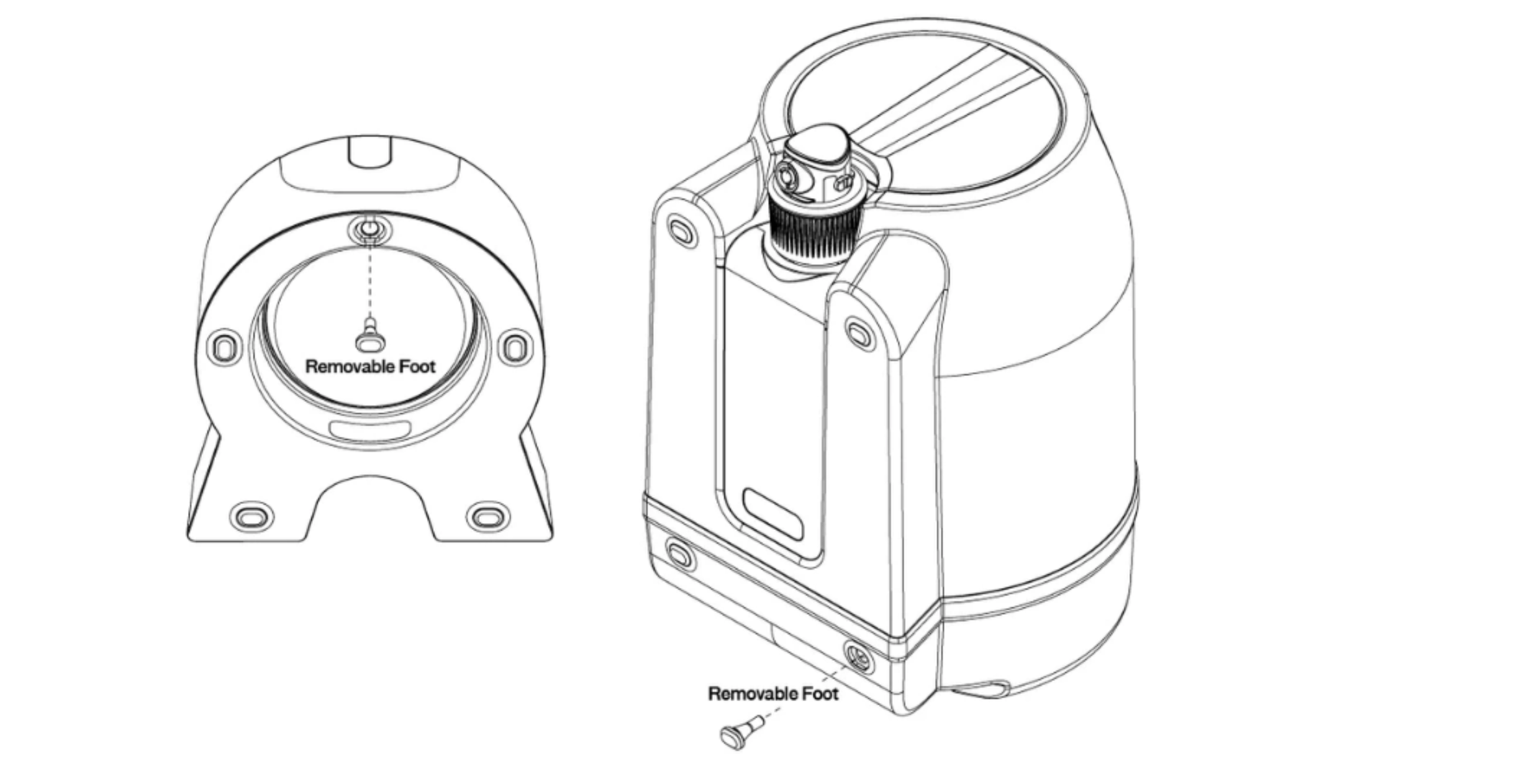
If you spot water between the seams again, it would really help us if you could:
- Take a few clear photos of the affected area
- Record a short video showing the issue
This helps our team understand the problem quickly and get it sorted for you.
Subscription Management
We're sorry to hear you'd like to cancel. If there's anything we can help with, please don't hesitate to drop us an email at [email protected] and we'll do our best to help.
As a small, growing company, we'd also love to hear any feedback you have. It really does make a difference.
If you're sure you'd like to go ahead, you can cancel directly from your bruusta account by following these steps:
- Head to bruusta.com
- Log into your account using the profile icon on the right-hand side
- Sign in to view your active subscriptions
- Select edit on the subscription you'd like to cancel
- Scroll to the bottom and select cancel
- Follow the steps to finalise your cancellation
- You'll receive a confirmation email once it's done
If you've got a bit too much at home and would prefer to pause rather than cancel, you can do that from your account too, and you can reactivate at any time.
If you'd like to skip your next order or adjust your delivery frequency, you can do this easily from your account:
- Head to bruusta.com
- Log into your account using the profile icon on the right-hand side
- Sign in to view your active subscriptions
- Select edit on subscription you'd like to reschedule
- Choose your new frequency, or select to skip a month
- Follow the steps to confirm
- You'll receive a confirmation email once it's done
If you need any support with managing your subscription, please reach out to our team at [email protected]
To reactivate your subscription and start receiving bruu bases and/or flavour shots again:
- Head to bruusta.com
- Log into your account using the profile icon on the right-hand side
- Sign in to view your subscriptions
- Select 'inactive'
- Choose 'reactivate'
- Follow the steps to finalise your reactivation
- You'll receive a confirmation email once it's done
Account Management
To update your shipping or email address, simply follow these steps:
- Head to bruusta.com
- Log into your account using the profile icon on the right-hand side
- Choose 'Profile' at the top
- Select the pencil icon next to the information you'd like to edit
- Enter your new details
- Click save
To update your payment information, simply follow these steps:
- Head to bruusta.com
- Log into your account using the profile icon on the right-hand side
- Choose 'Profile' at the top
- Scroll to the bottom and select 'Add a payment method'
- Enter your new details
- Click save
- Don't forget to assign the new payment method to your active subscriptions to make sure everything is up to date